Feature Lifecycle
The busy age of today makes it easy to forget feature flags in the code, and keep them either enabled — or disabled — forever. They even overlap and nest sometimes, and create a grey area in feature flag management in which nobody will ever touch those features because things just work as they are. For most of us, software management is already too busy to fit in feature flag hygiene.
As a good practice, feature flags should not live forever.
Most of the time, the ultimate goal of a feature flag is to help serve new software to audiences in a controlled way, for example with percentage rollouts. Once the feature is fully rolled out, the feature flag can be safely removed.
Feature Lifecycle highlights features at each stage of the development and release process, making it easier to spot feature flags that should be removed: first from the code, then from Flagsmith. Find it under Lifecycle in your project's navigation.
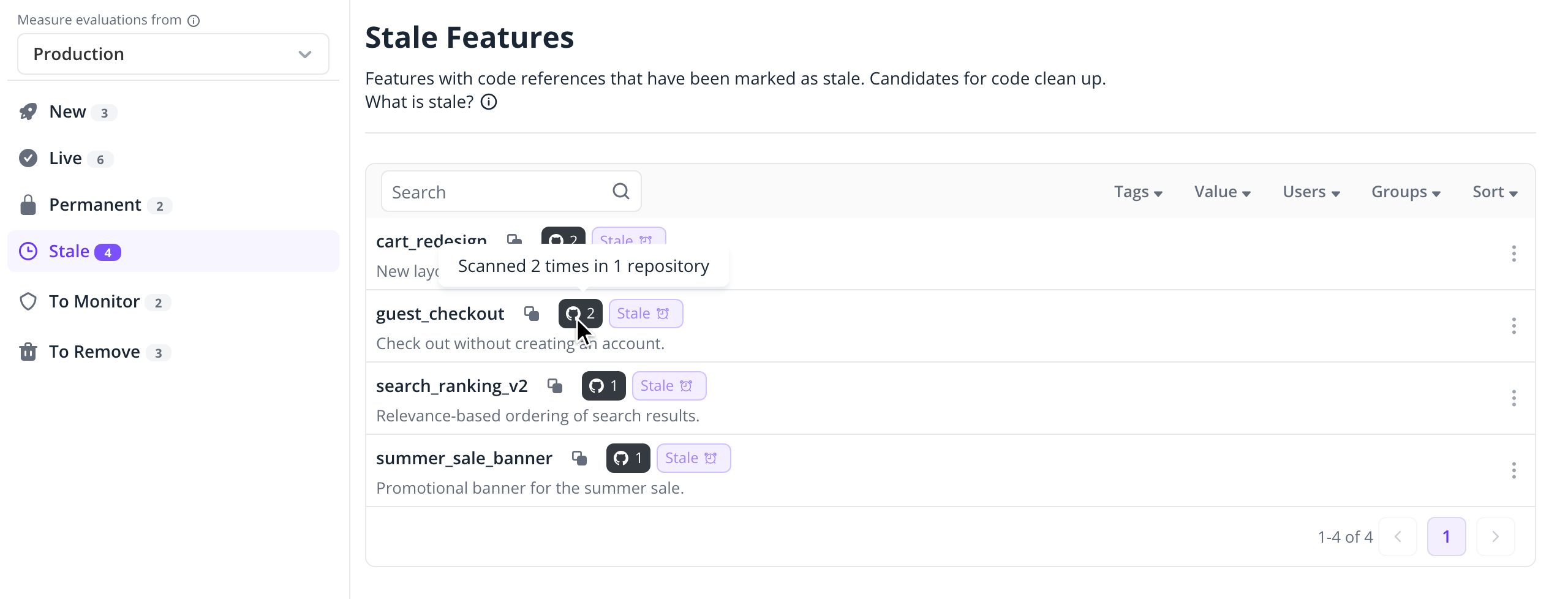
The stages of a feature flag
Within its life, and in the Lifecycle tab, a feature flag goes through these stages:
New: Created in Flagsmith, but not in the code yet. BecomesLiveonce a code scan finds it.Live: In the code and still being rolled out. Nothing to do.Permanent: Meant to stay, e.g. a kill switch. Never flagged for clean-up.Stale: Still in the code, but untouched for a while. Time to remove it from the code.To Monitor: Gone from the code, but still being evaluated, e.g. by an older release of the application. Wait before deleting.To Remove: Gone from the code and no longer evaluated. Safe to delete from Flagsmith.
How to set up
Make sure you set up Code References. Flagsmith does not have access to your codebase, and only keeps track of where feature flags are referenced (file names and line numbers).
SDKs evaluating feature flags must also enable Flag Analytics, so that Flagsmith knows about per-feature usage.
The Stale, To Monitor and To Remove stages rely on
Stale Flag Detection, available on the Scale-up and Enterprise
plans.
Self-hosted installations of Flagsmith also need to ensure Flag Analytics is available on the API side. See Environment Variables.